During the session
When the wifi drops
What the board does with no signal, and how to tell when everyone is seeing the same thing again.
For hosts and co-hosts2 min
- 1
Keep tapping
Every tap lands on the board straight away and is saved on the phone, then sent. Nothing waits on the network, and nothing is lost for want of it.
- 2
Read the status
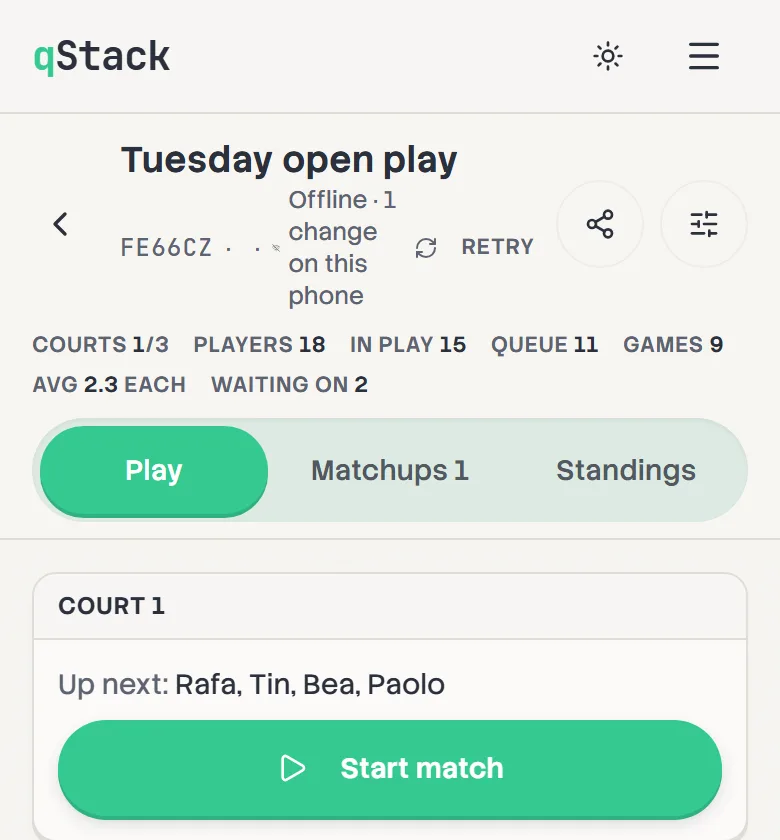
Look next to the board's code at the top. A green wifi icon means everything is sent, and a spinner means it's sending. Offline · 3 changes on this phone means they're kept here until the connection is back. Tap Retry to try again sooner.
- 3
Open it again with no signal
A board this phone has opened before opens again even with no internet, so a host who arrives at a gym with no signal still has their board.
- 4
Two phones, one offline
If games were started on another phone while this one was offline, the board tells you once it's back, so you can check the courts and results before carrying on.